
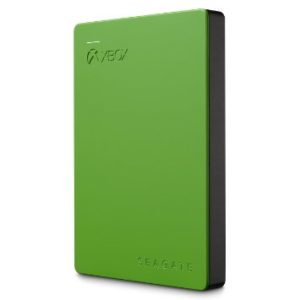
Nowadays 500 GB just ain’t cutting for an Xbox One hard drive. We need more disk space so we can store more games and the only way to do that is by adding an external hard drive.
The Seagate 2TB Game Drive for Xbox was created exclusively for Xbox One and Xbox 360. It is super slim, can fit right in your pocket, and can hold about 50 games of so. Of course you could also store music and videos on it as well.
The best part about the Seagate 2TB Game Drive, or any external hard drive, is that you can free up considerable space on your Xbox, reduce the amount of load times for games (because the RPM’s of the drive are faster than the Xbox), and you can take your external drive with you to a friends house.
The Seagate Drive is Easy To Install
The Seagate External Drive has plug-and-play capability offers you instantaneous power up. Your Xbox will automatically detect your drive and walks you through the setup process. It only takes a few minutes.
When you first install it you can put music or videos right on the drive. To install games though you need to format the drive first. I would advise doing this as the first thing you do when you get it.
When you install the drive you will notice you have 1.8 TB of free space and not 2 TB. This is common on all external drives because there are some system files that take up a little bit of space.
Moving Games From Your Hard Drive to the Seagate Drive is Easy
If you have games on your Xbox hard drive and you want to shift them over to the Seagate Game Drive for Xbox its pretty easy. All you need to do is have your Seagate drive plugged in, go to MANAGE GAMES, and then select MOVE.
From there you just need to select your Seagate drive and then the game will move from your Xbox hard drive over to your Seagate external drive.
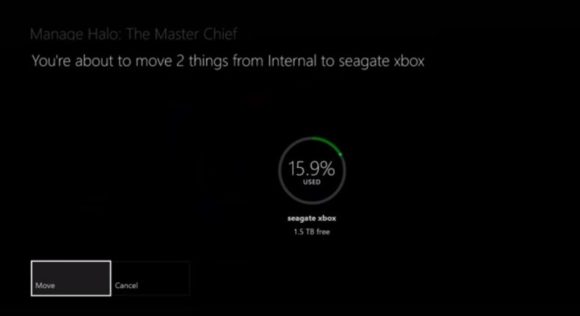
Note: Large games take a little while to move. Don’t expect instant results.
Take Your Games to Go
You can simply unplug the Seagate Video game Drive and take your whole game library to your friends house. All you need to do is plug in your drive to their USB port and then sign in on their Xbox. Once you do that you can access the games on the drive.
Compatible With Xbox One and Xbox 360
The Seagate Game Drive works with both Xbox One and Xbox 360. It plugs straight into any USB port in your console.
Why I Bought The Seagate Game Drive
At the time my internal Xbox hard drive was at about 65% capacity…mostly filled with huge games like Forza 5, Forza 6, and Project Cars. I needed something to fee up some space. I did research and was considering the Seagate drive and the WD 2TB My Passport X for Xbox One Portable External Hard Drive.
Both drives looked promising and had all 5 Star reviews on Amazon…so to be honest I picked the Seagate because it was exclusively made for the Xbox and it had over 400 5 star reviews. Overall I am extremely happy with it, it works perfectly as advertised, and I have freed up so much space on my internal Xbox drive.
It did make my games load significantly faster also. For example, normally Forza 6 takes roughly 25 seconds to load a race, now a race loads in about 15 seconds or so when I play the game directly from the Seagate drive.
There are other options for larger space if you need it. I ended up getting the 2TB drive, but there is also a 4TB version.


Check Out Xbox One Hard Drives at Amazon

[ag-after-product-details]
[/ag-after-product-details]
[ag-after-reviews]
Get The Seagate 2TB Game Drive for Xbox

Have you tried an external drive with your X Box One? If so let me know what your experience is and which external drive you use in the comments below.
[/ag-after-reviews]



There are no comments yet, add one below.